Grammarly built its reputation catching typos and comma splices — but that reputation is now outdated. This Grammarly AI review covers how far Grammarly AI features have evolved into a full generative writing AI platform, comparing free vs premium tiers, testing real writing samples, and benchmarking Grammarly vs ProWritingAid for anyone deciding where to invest in 2025.
From Spell Checker to Writing AI: How Grammarly Has Evolved
The modern Grammarly AI features set goes far beyond grammar correction. With GrammarlyGO, the platform’s generative AI layer, Grammarly can now draft full paragraphs, rewrite tone, summarize long documents, and generate content ideas from a simple prompt — positioning it as a genuine writing AI competitor to tools like Jasper and Copy.ai, not just an editing add-on. According to Grammarly’s official product announcements, GrammarlyGO was trained specifically to preserve the user’s own voice rather than producing generic AI output.
Grammarly AI Features: Full Breakdown
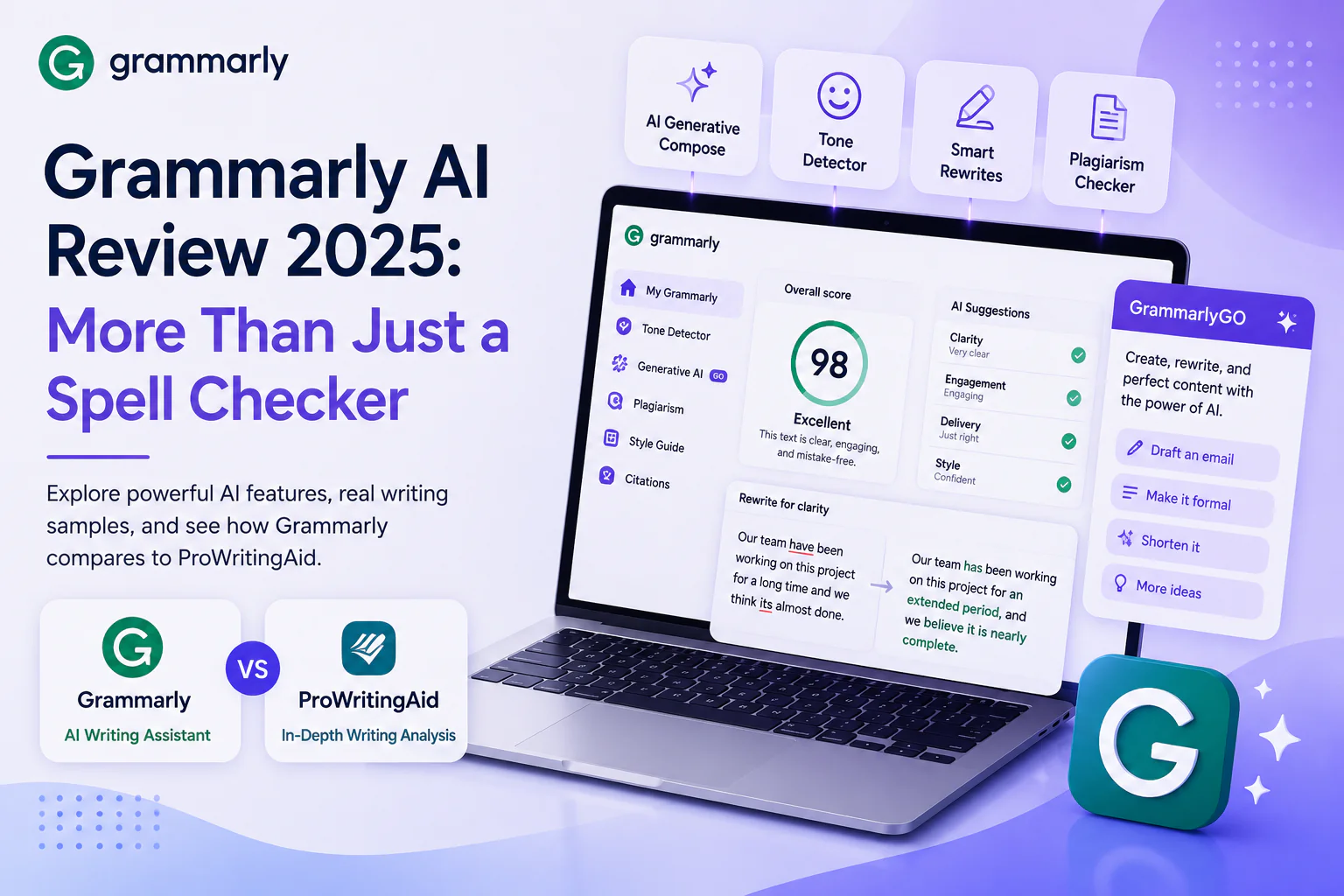
- • Grammarly AI Tone Detector: Identifies the emotional tone of your writing and suggests adjustments before you hit send
- • Grammarly AI Generative Compose: Drafts full emails, posts, and documents from a short prompt using GrammarlyGO
- • Grammarly AI Rewrite Suggestions: Offers full-sentence rewrites for clarity, conciseness, and tone — not just word-level fixes
- • Grammarly AI Plagiarism Checker: Premium-tier feature that scans against billions of web pages and academic papers
- • Grammarly AI Style Guide: Business plans can train Grammarly AI on brand-specific terminology and tone preferences
- • Grammarly AI Citations: Automatically formats citations in APA, MLA, and Chicago style
Grammarly Free vs Premium: What’s the Real Difference?
| Feature | Grammarly Free | Grammarly Premium |
| Basic grammar/spelling | Yes | Yes |
| Tone detection | Limited | Full |
| Full-sentence rewrites | No | Yes |
| GrammarlyGO generative AI | Limited prompts | Unlimited |
| Plagiarism checker | No | Yes |
| Vocabulary enhancement | No | Yes |
| Price | Free | $12/month (annual) |
For casual users, Grammarly free covers the basics well. But the real value of Grammarly AI features — full-sentence rewrites, unlimited generative drafting, and plagiarism detection — sits behind the Premium paywall. Writers, students, and professionals producing content regularly will find the $12/month investment pays for itself quickly.
Grammarly vs ProWritingAid: Which Writing AI Wins?
The Grammarly vs ProWritingAid debate comes down to depth versus breadth. Grammarly’s strength is its ubiquity — browser extensions, desktop apps, and integrations across Gmail, Google Docs, and Slack make it the most convenient writing AI to use daily. ProWritingAid offers deeper stylistic analysis — sentence length variation, overused words, pacing — making it a favorite among novelists and long-form writers. For an in-depth look at ProWritingAid’s reports, see ProWritingAid’s official comparison page.
| Criterion | Grammarly | ProWritingAid |
| Ease of use | Excellent | Moderate (steeper learning curve) |
| Generative AI writing | Yes (GrammarlyGO) | Limited |
| Style/readability reports | Basic | Extensive (20+ reports) |
| Integrations | Extensive (Gmail, Docs, Slack) | Moderate (Word, Scrivener, Docs) |
| Price (Premium) | $12/month | $10/month |
| Best for | Everyday professional writing | Long-form fiction & deep editing |
Real Writing Sample Test: Grammarly AI in Action
To test Grammarly AI features in practice, we ran a rough draft paragraph through the tool. The original sentence “Our team have been working on this project for a long time and we think its almost done” was flagged for subject-verb agreement (“have” → “has”), a missing apostrophe (“its” → “it’s”), and the writing AI also suggested a more confident tone: “Our team has been working on this project for an extended period, and we believe it is nearly complete.” This kind of contextual, tone-aware suggestion is what separates modern Grammarly AI features from a basic spell checker.
Pros and Cons of Grammarly AI
- • Pro: Grammarly AI features integrate seamlessly across nearly every app you already use
- • Pro: GrammarlyGO generative writing AI saves real time on first drafts
- • Pro: Tone detection prevents miscommunication in professional emails
- • Con: Premium pricing is required to unlock the most valuable AI features
- • Con: In the Grammarly vs ProWritingAid comparison, style analysis depth still favors ProWritingAid for fiction writers
Final Verdict: Is Grammarly AI Worth It in 2025?
This Grammarly AI review confirms that Grammarly has successfully transformed from a spell checker into a legitimate writing AI platform. The Grammarly AI features available on Premium — generative drafting, tone detection, full-sentence rewrites — justify the subscription for anyone who writes professionally. If your priority is deep stylistic feedback for long-form creative work, the Grammarly vs ProWritingAid comparison suggests trying ProWritingAid alongside it. For most everyday professional writing, Grammarly remains the most convenient, capable choice.
| Need a content and communication AI stack tailored to your business writing needs?Get a free AI tooling consultation from AventisHub → |