My sister-in-law works remotely for a mid-sized insurance company, and last month she mentioned that her manager had stopped asking “were you online at 9 am” and was starting to ask “did the renewal packet go out.” Little change, big deal. There was no memo announcing this transformation. It just happened, meeting by meeting, tool by tool. In this post, we’ll see how AI is really impacting remote work today – not the future prediction of hype cycles but the reality of real surveys and real workplaces in 2026. We’ll also talk about what problems it’s not solving – plenty!
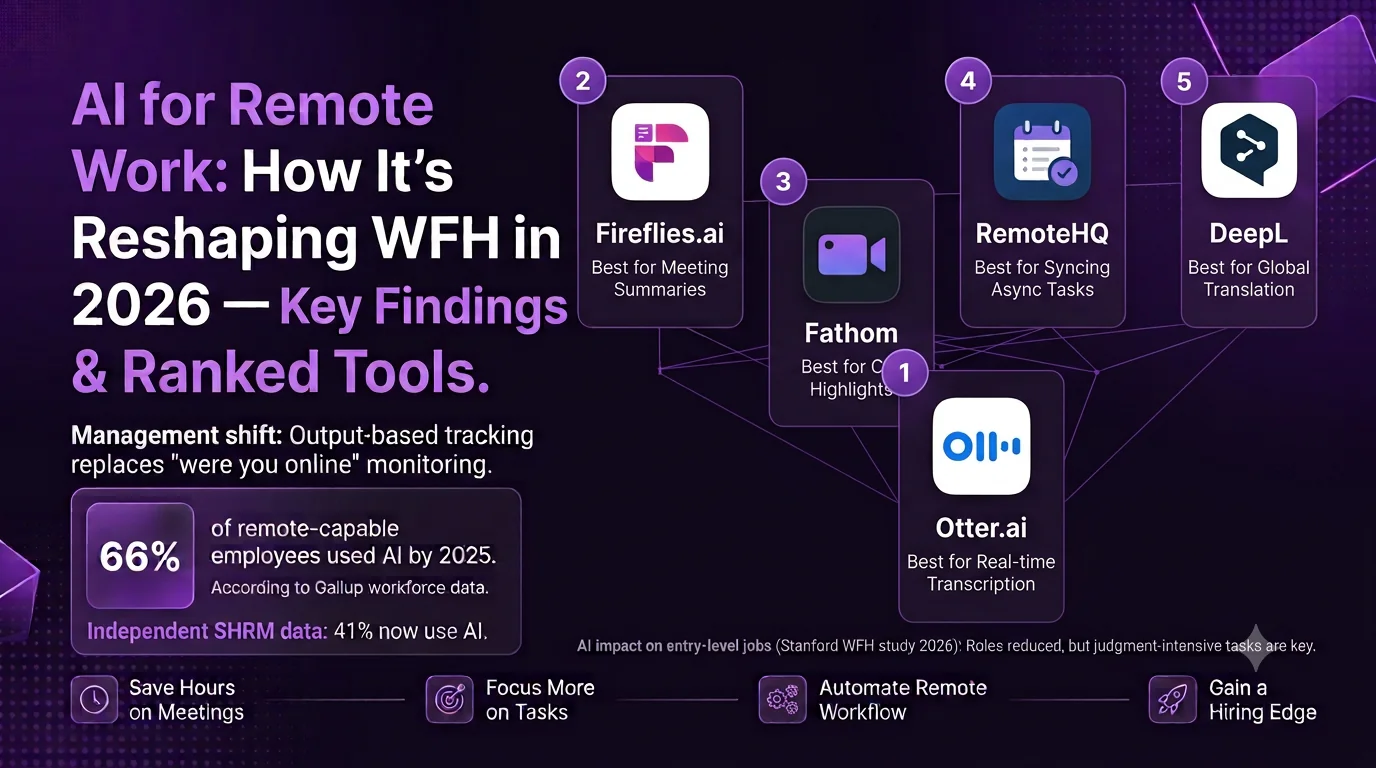
A surprising finding from the Gallup workforce trend tracker stopped me dead in my scrolling: AI usage among remote-capable employees shot up from 28% to 66% from Q2 2023 to 2025.This is not gradual adoption; this is a full flip of one entire workforce category in about two years’ time. Daily use in remote-capable roles was up from 13% to 40% during this period.
Why This Matters Right Now
Another independent SHRM study of almost 6,000 American workers this spring shows 41% now use AI at work, and it is important to mention that it is not only used there but workplaces that adopt it also experience much more disruptions in staffing and role structuring than those who have not adopted AI yet. As far as remote teams go, this is significant as AI technology for remote employees is no longer only about increasing productivity. Now, AI technology in remote settings turns into a certain style of management and into a certain type of job security, depending on where you are located on the organizational chart.
For whom: if you are a remote or a hybrid employee who wants to see if AI changes your everyday life or only announces about it in Slack channels, this piece was written for you. In case If you’re looking for the best AI meeting assistants available today, check out our detailed comparison of the best AI meeting summary tools.
5 Ways AI Is Actually Changing Remote Work
1. Meetings are shrinking, but not disappearing
This is the most visible change, and also the one people complain about least. Tools like Otter, Fireflies, and Fathom now sit in on calls, transcribe them, and hand back a summary with action items before you’ve closed your laptop. I’ve watched a team go from a mandatory 30-minute weekly sync to a 10-minute one because half the update was already sitting in a shared doc from the AI notes. The catch nobody mentions: teams that lean on this too hard start losing the informal context that used to leak out in meetings — the “oh by the way” comments that never make it into a structured summary.
Best for: teams running 3+ meetings a day who are drowning in follow-up admin more than they’re missing face time.
Pros:
•It saves time in actual administration—20 to 40 minutes per week is common once the whole team has gotten used to it
•It records action items instead of leaving them in a notebook to forget about
•It makes onboarding easier because they can search previous meeting notes rather than asking “wait, why do we do it this way”
Cons:
•The small talk during the meetings, which serves an important relational role, gets left out of the AI notes
•Everyone may not like being on camera, even if they don’t say so.
2. Async work is finally becoming a real default, not a buzzword
“We’re async first” was mostly a way of saying “we still need Slack responses within an hour but won’t say so.” Artificial Intelligence is slowly making real async communication possible through tools that can help you digest and summarize an entire conversation, write a response, or even translate a message, all without a single person being awake. Notion AI and other workspace bots can help you understand “how’s the status on the Q3 launch?” without needing to ping three different people.
Good for: distributed teams working in more than 3-4 time zones.
Pros:
·Teams spread across time zones save time not having to wait for one individual to wake up
· Quality of documentation improves almost unintentionally because AI technology works best on well-maintained documentation
· Lessens the pressure of being “always online” that resulted from asynchronous cultures in name only
·Cons:
· Teams without prior documentation skills do not benefit automatically because AI just enhances whatever documentation practices are in place
· There are managers who use the excuse that “AI will catch you up” to avoid giving context at all
3. Output-based management is replacing “were you online” tracking — for some roles
And that’s precisely the trend that my sister-in-law spoke about, and it goes beyond one single example. Since artificial intelligence tools provide managers with an accurate picture of actual productivity in terms of tickets closed, drafts written, calls taken care of, the need to monitor hours spent online disappears. According to Gallup, there’s a noticeable increase in disruption to staffing and structuring of work among companies adopting artificial intelligence technologies compared to companies not using such technologies.
Best for: individual contributors working in areas where their work can be easily measured.
Pros:
·Reduces the fear of surveillance programs that became prevalent during early stages of remote work
·Pays off employees who are efficient but do not show “visible busyness”
·Helps conduct performance discussions in a more practical way
Cons:
·Jobs where performance cannot be measured (relationship building, mentoring, cultural work) will receive little attention in such a performance-driven approach
·Not all businesses have adopted this approach, many continue to monitor their employees more and more
4. Entry-level remote roles are the ones actually shrinking
While I’m not a fan of this particular report, this is the reality of what happened with AI and remote work. As per the 2026 Stanford WFH economic report on remote work, there is quite a significant number of jobs that have been cut from 2025 that have been replaced by AI. But on the bright side, the senior jobs which need judgment and client management have become more available for remote work. This is the reality of this trend for early-career workers.
Best for: this is definitely not a best for situation; rather, it’s just a caution for early-career remote workers.
Pros :
· Repetitive tasks which can be performed in three easy steps are definitely automated
· There are some organizations who are investing back the saved money in training their employees rather than laying off people
Cons :
· There is shrinking in junior level jobs which is actually making it tough for the newbies
· Learning how to use AI technology is a popular advice given in career counseling but not taking into account the fact that it’s the entry step which is vanishing
5. Hiring and onboarding are getting faster, and a little more impersonal
AI-enabled screening, scheduling, and onboarding tools can allow a remote new hire to go from offer letter to “productive by day three” more quickly than just a few years ago. According to FlexJobs, there is consistent growth in remote hiring across positions such as AI engineering and cybersecurity, and companies are increasingly turning to AI-powered copilots to help onboard new hires without moving any planes. Based on my own experience trying out some of these onboarding processes, it appears that the process works better, but new hires do not have face-to-face conversations with a human on the team for weeks, which is not good for retention.
Best for: fast-growing distributed companies with multiple time zones to onboard without being tied to one person’s schedule.
Pros:
· Eliminates the time to productivity issue that was a problem for remote onboarding
· Helps to overcome the “tribal knowledge” issue in which everything is known by one employee
· Liberates senior employees from having to do repetitive tasks in onboarding
Cons:
· May unintentionally substitute a human interaction that encourages people to stay in remote hiring positions
· Automated onboarding process does not eliminate the need for maintenance of documents by a human being
Quick Comparison: Where AI Is Changing Remote Work Most
| Area | Real-World Example | Main Risk | Who’s Affected Most |
| Meetings | Otter, Fireflies, Fathom summarizing calls | Loses informal context and relationship chatter | Teams with 3+ daily meetings |
| Async work | Notion AI reading project docs to answer status questions | Only works if documentation habits are already good | Multi-timezone distributed teams |
| Management style | Output tracked over hours-online | Undervalues non-measurable work like mentorship | Individual contributors, especially writers/coders |
| Entry-level hiring | Routine tasks automated instead of hired out | Junior roles shrinking faster than senior ones | New grads, career-changers |
| Onboarding | AI-assisted ramp-up docs and scheduling | Can replace human welcome, hurting retention | Fast-growing distributed companies |
How to Adapt, Depending on Where You Sit
· You’re an early career remote worker: it’s not enough to get good at using AI tools – get good at the judgment-intensive skills surrounding them (communications with clients, editing AI-generated content, recognizing errors in AI output), which is what will remain distinctly human for longer.
· You lead a remote team: assess if you have a “async-first” culture, or if it’s merely a poorly-managed environment with Slack and other messaging channels creating untracked pressure, before bringing AI tools into the equation.
·You’re a mid-career individual contributor who fears surveillance software: urge your organization towards output-tracking instead of activity-monitoring technology – the numbers point to that being a natural progression for AI-using firms.
·You’re in the HR or people ops department: pay close attention to onboarding retention metrics if you’ve streamlined your onboarding process – fast doesn’t necessarily equal sticky.
·You’re a solo freelancer or operator: of all the tools on the list, the ones generating meeting summaries and asynchronous documentation are where you’ll get the most bang for your buck.
What I would actually do: If I had the chance to advise somebody new to remote working today, I would advise them to get used to using AI tools for meetings and documentation fast, since that is now mandatory, but fight hard against AI summaries replacing relationship-building done in meetings before. The tools do an excellent job at solving the administrative issue. They won’t help to solve the issue of loneliness and lack of mentorship that is now becoming evident from the isolation statistics of remote workers. AI meeting assistants are only one part of a productive remote workflow. We also cover more AI productivity tools that can help automate repetitive work. If you’re exploring how artificial intelligence is transforming modern workplaces beyond remote collaboration, AventisHub regularly publishes practical insights on AI, business technology, and digital productivity.
Frequently Asked Questions
Is AI actually replacing remote jobs, or just changing how people work?
Both, depending on the role. Entry-level and routine remote positions have seen real reductions tied to AI automation, while senior roles requiring judgment and client relationships have grown in remote availability. It’s less “AI vs. humans” and more a reshuffling of which roles survive.
What are the best AI tools for remote teams at the moment?
It varies depending on the problem area. If your team has lots of meetings, then AI notetaking tools like Otter or Fireflies would be best for you. Meanwhile, async remote teams get the most use out of workspace assistants like Notion AI that can answer questions based on your existing documentation.
Does using AI in the workplace increase the productivity of remote workers?
Yes, those who use AI regularly report higher productivity, however, the broader research still lacks evidence that AI has significantly changed how companies work so far – the changes are noticeable but individual.
Does AI make remote work more or less isolating?
More isolating in some ways, indirectly. The fact that AI starts to absorb the load of regular communication and meetings means that some of the incidental socializing related to them also goes away, and it corresponds with the increasing number of remote workers feeling isolated this year.