In this Microsoft Copilot review, we examine whether Microsoft’s flagship AI assistant deserves its place at the top of the AI office tools category. Since its integration into Microsoft 365, Microsoft Copilot has become one of the most widely used AI assistants in enterprise environments. But is Microsoft Copilot truly the best AI assistant available in 2026? Let us find out.
What Is Microsoft Copilot?
Microsoft Copilot is an AI assistant built by Microsoft and powered by OpenAI’s GPT-4 technology. Microsoft Copilot is deeply integrated into Microsoft 365 AI products including Word, Excel, PowerPoint, Outlook, and Teams. Unlike standalone AI tools, Microsoft Copilot understands the context of your documents, emails, meetings, and data — making it arguably the most contextually aware AI office tool available. You can read more about Microsoft’s official vision for Microsoft Copilot on the Microsoft 365 Copilot product page.
Microsoft Copilot Features: Full Breakdown
Copilot in Word
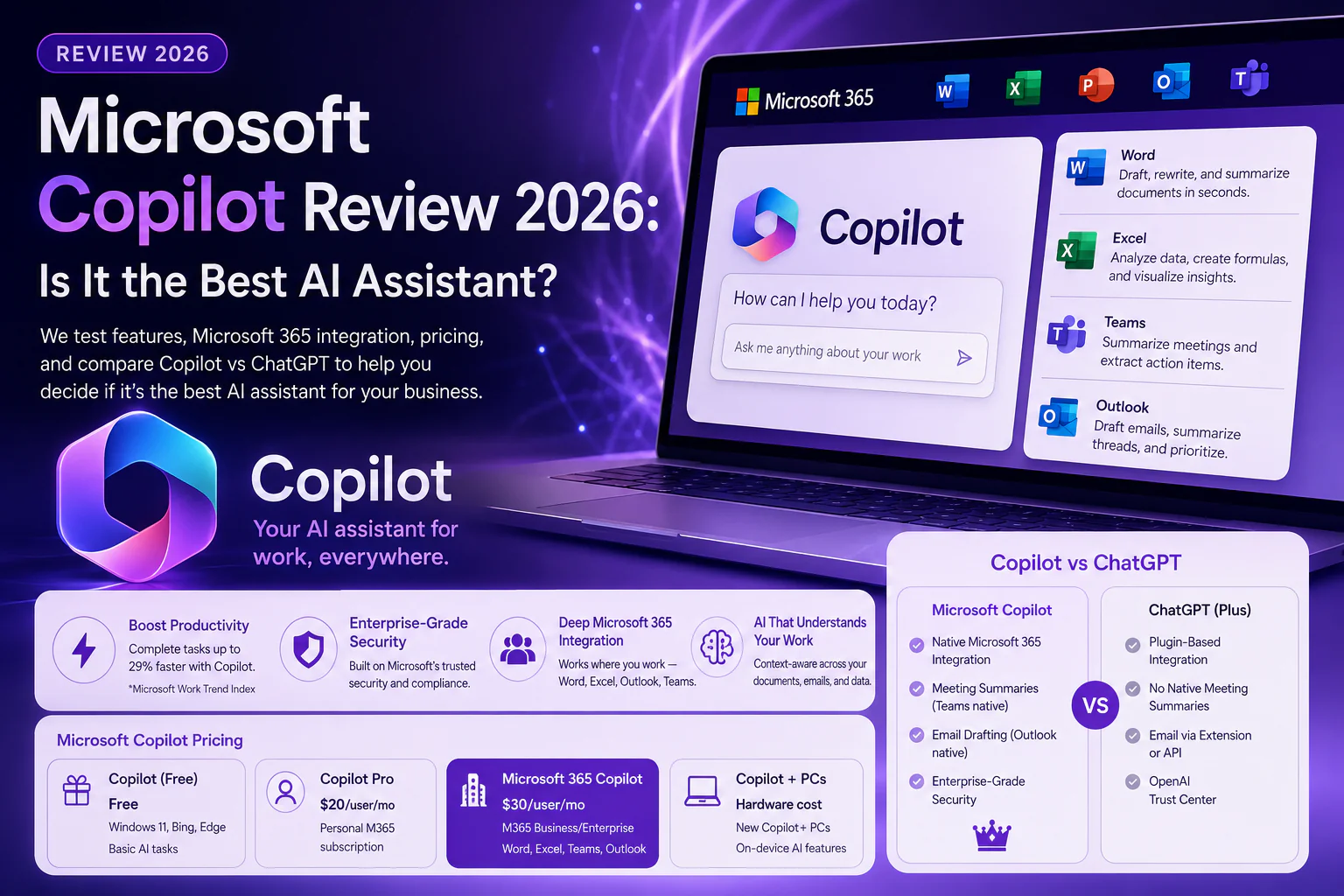
Microsoft Copilot in Word can draft entire documents from a brief prompt, summarize lengthy reports, rewrite sections for tone or clarity, and even compare two documents. For content teams already using Microsoft 365 AI, this eliminates hours of manual drafting. According to Microsoft’s own productivity research, users with Microsoft Copilot complete writing tasks up to 29% faster.
Microsoft Copilot in Excel
Microsoft Copilot transforms Excel for non-technical users. With natural language prompts, Microsoft Copilot can generate formulas, create pivot tables, analyze trends, and produce visualizations — no VBA knowledge required. This Microsoft 365 AI capability makes Microsoft Copilot one of the most powerful AI office tools for data-driven teams.
Microsoft Copilot in Teams and Outlook
Microsoft Copilot in Teams can transcribe and summarize meetings in real time, generate action items, and answer questions about what was discussed. In Outlook, Copilot email drafts replies, summarizes threads, and flags priority messages — a direct boost for Microsoft 365 AI productivity. This level of integration sets Microsoft Copilot apart from competitors in the Copilot vs ChatGPT debate.
Microsoft Copilot vs ChatGPT: Key Differences
| Feature | Microsoft Copilot | ChatGPT (Plus) |
| Microsoft 365 Integration | Native & deep | Via plugins only |
| Meeting Summaries | Yes (Teams native) | No |
| Email Drafting | Yes (Outlook native) | Via extension/API |
| Data Analysis | Excel Copilot native | Code Interpreter |
| Price | $30/user/mo (M365 add-on) | $20/mo |
| Best For | Microsoft 365 users | General-purpose AI |
| Privacy / Enterprise | Microsoft enterprise grade | OpenAI trust center |
The Copilot vs ChatGPT comparison ultimately comes down to your ecosystem. If your organization runs on Microsoft 365 AI tools, Microsoft Copilot wins decisively because of its native, context-aware integration. For general-purpose AI tasks outside the Microsoft ecosystem, ChatGPT remains more flexible. For an independent take on the Copilot vs ChatGPT debate, see The Verge’s Microsoft Copilot coverage.
Microsoft Copilot Pricing
| Version | Price | Included In | Best For |
| Microsoft Copilot (Free) | Free | Windows 11, Bing, Edge | Basic AI assistant tasks |
| Copilot Pro | $20/user/mo | Personal M365 subscription | Individuals with Office apps |
| Microsoft 365 Copilot | $30/user/mo | M365 Business/Enterprise | Teams, Word, Excel, Outlook |
| Copilot+ PCs | Hardware cost | New Copilot+ laptops | On-device AI features |
Microsoft Copilot Review: Pros and Cons
Pros
- • Microsoft Copilot delivers unmatched Microsoft 365 AI integration — no other AI works this natively in Office apps
- • Meeting summaries and Copilot email are game-changers for enterprise productivity with Microsoft Copilot
- • Microsoft Copilot understands your company’s documents, emails, and data for contextual responses
- • Enterprise-grade security makes Microsoft Copilot safe for regulated industries
- • Constant updates keep Microsoft Copilot features improving rapidly
Cons
- • Microsoft Copilot is expensive at $30/user/month on top of existing M365 costs
- • In Copilot vs ChatGPT general reasoning tasks, ChatGPT still leads
- • Microsoft Copilot requires a Microsoft 365 subscription to unlock its best AI office tools features
- • Microsoft Copilot can occasionally produce inaccurate summaries — always verify critical outputs
Who Is Microsoft Copilot Best For?
- • Microsoft Copilot is the clear winner for existing Microsoft 365 users in corporate environments
- • Legal, finance, and consulting teams benefit most from Microsoft Copilot‘s document and data analysis capabilities
- • Remote teams that live in Teams and Outlook will see immediate ROI from Microsoft Copilot meeting summaries and Copilot email
- • Individual freelancers may find Microsoft Copilot pricing steep — Copilot Pro at $20/mo is better for personal use
Microsoft Copilot Review: Final Verdict
After this thorough Microsoft Copilot review, the answer is nuanced. Microsoft Copilot is unquestionably the best AI office tool for Microsoft 365 environments — no other AI assistant integrates this deeply with Word, Excel, Teams, and Outlook. If you are already a Microsoft 365 AI user, Microsoft Copilot is a near-essential upgrade. In the broader Copilot vs ChatGPT comparison, each tool wins in its own domain — but for workplace productivity, Microsoft Copilot takes the crown. For the latest Microsoft Copilot updates and features, follow Microsoft’s official Copilot blog.