
Data has always driven better business decisions — but until recently, extracting insights from a spreadsheet or database required either technical skills most professionals do not have or a data team with a week-long backlog. AI for data analysis changes that equation entirely. In 2026, anyone can upload a spreadsheet, ask questions in plain English, and receive charts, summaries, and pattern analysis in seconds — no SQL, no Python, no data science degree required. This beginner-friendly guide covers exactly how to use AI data tools for real business analysis: ChatGPT Advanced Data Analysis, Julius AI, and Rows.com. By the end, you will have a clear picture of how to start applying no-code data AI to your own data today. If you are new to using AI in your workflow, start with our guide to ChatGPT productivity tips and our overview of the 10 best AI tools for productivity in 2026 to set the context.
Why AI for Data Analysis Is a Game-Changer for Non-Technical Professionals
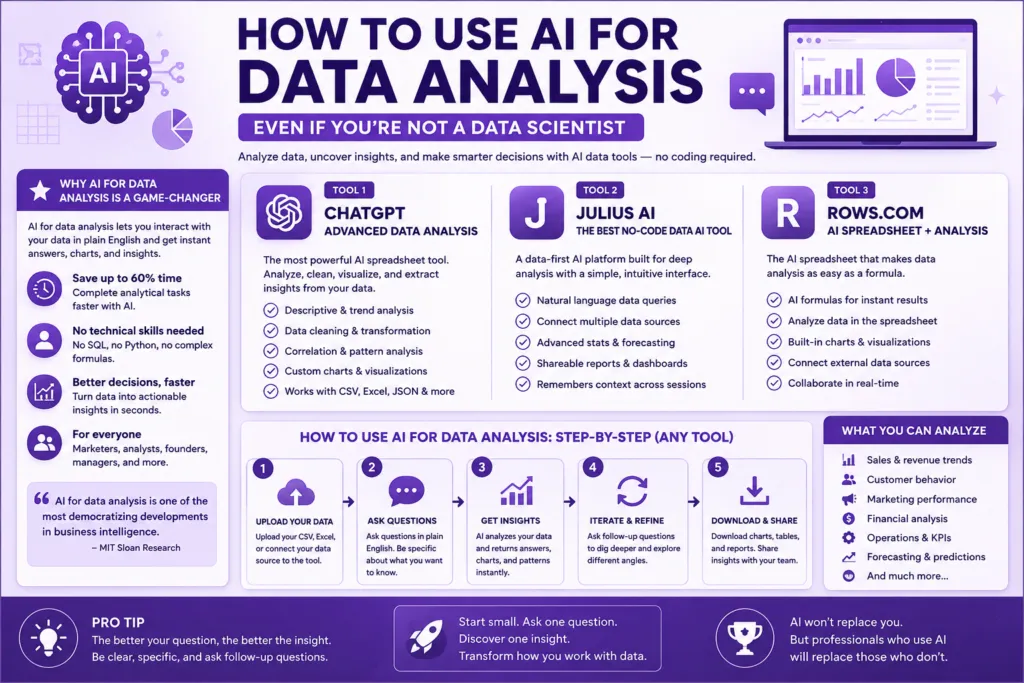
Before AI data tools, non-technical professionals faced a frustrating gap: they had data, they had questions, but they lacked the technical capability to bridge the two. Building even a basic pivot table or trend chart required Excel proficiency many workers do not have. Writing a SQL query to filter a database was out of reach entirely. AI for data analysis closes this gap by letting you interact with your data in natural language — the way you would explain a question to a colleague. According to MIT Sloan’s research on AI augmentation, non-technical employees using AI data analysis tools complete analytical tasks up to 60% faster than peers without AI access. That productivity delta is why no-code data AI is one of the most democratizing developments in business intelligence.
Tool 1: ChatGPT Advanced Data Analysis — The Most Powerful AI Spreadsheet Tool
ChatGPT’s Advanced Data Analysis feature (formerly Code Interpreter) is the most capable ChatGPT data analysis tool available to the public and the starting point for anyone serious about AI for data analysis. Available on ChatGPT Plus and Team plans, it lets you upload CSV, Excel, or JSON files and ask natural language questions about your data — and ChatGPT writes and executes Python code behind the scenes to generate the answer.
What ChatGPT Advanced Data Analysis Can Do
• ChatGPT data analysis — Descriptive statistics: Upload a sales CSV and ask ‘What were our top 10 products by revenue last quarter?’ and receive a ranked table instantly
• ChatGPT data analysis — Trend analysis: Ask ‘Show me monthly revenue trends over the last 12 months’ and receive a line chart generated automatically
• ChatGPT data analysis — Data cleaning: Ask ChatGPT to ‘Find and flag all rows with missing values’ or ‘Remove duplicate entries’ — it handles it in seconds
• ChatGPT data analysis — Correlation analysis: Ask ‘Is there a correlation between ad spend and conversion rate?’ and receive a scatter plot with a correlation coefficient
• ChatGPT data analysis — Custom visualizations: Ask for any chart type — bar, pie, heatmap, funnel — and
How to Use ChatGPT Advanced Data Analysis: Step-by-Step
1. Log into ChatGPT Plus and start a new conversation. The Advanced Data Analysis capability is automatically available.
2. Upload your data file: Click the paperclip icon and upload your CSV or Excel file. ChatGPT will confirm it has read the data.
3. Ask your first question in plain English: ‘What is the average order value by customer segment?’ or ‘Which sales rep closed the most deals in Q1?’
4. Iterate with follow-up questions: This is the key advantage of
5. Download your outputs: Charts and processed data can be downloaded directly from the
For business applications of ChatGPT data analysis, explore the 7 ChatGPT prompts that transform your workday guide on this site — several of those prompt templates are directly applicable to data analysis tasks.
Tool 2: Julius AI — The Best Dedicated No-Code Data AI Tool
Julius AI is a purpose-built no-code data AI platform designed specifically for data analysis — which means it goes deeper on analytics features than ChatGPT while remaining accessible to non-technical users. Where ChatGPT data analysis is general-purpose, Julius AI is optimized exclusively for AI for data analysis workflows, with a data-native interface and a broader range of chart and statistical analysis options.
Julius AI Key Features
• Julius AI Natural Language Queries: Ask data questions in plain English — Julius writes and runs the analysis code invisibly, returning only the answer and visualization
• Julius AI Multiple Data Sources: Connect Google Sheets, Excel, CSV, PostgreSQL, MySQL, and Snowflake — making Julius the most flexible
• Julius AI Statistical Analysis: Regression analysis, hypothesis testing, and forecasting — capabilities that go well beyond what most non-technical users could access before no-code data AI
• Julius AI Shareable Reports: Generate shareable, embeddable analysis reports directly from your Julius AI workspace
• Julius AI Memory: Julius remembers context across your data conversations — so you can build progressively deeper analysis across multiple sessions
Julius AI pricing starts at $20/month for the Pro plan, with a limited free tier for evaluation. Visit julius.ai to try it with your own dataset. For teams producing regular data reports, Julius AI pairs well with AI spreadsheet tools like Rows.com (covered below) and automation platforms covered in our Zapier AI features guide.
Tool 3: Rows.com — The Best AI Spreadsheet for Business Teams
Rows.com is an AI spreadsheet that looks familiar — it works like Google Sheets or Excel — but with AI built directly into every cell and function. The key differentiator is that Rows AI lets you write formulas in plain English, summarize spreadsheet data with one click, generate AI-written analysis columns, and connect live data sources (Stripe, HubSpot, Google Analytics) directly into your AI spreadsheet without any ETL work. For business teams that live in spreadsheets but need more analytical power than Excel formulas can provide, Rows.com is the most practical entry point into no-code data AI.
Rows.com Key Features
• Rows AI Summarize: Highlight any range of cells and ask Rows AI to summarize the data in a sentence — instant executive summary without a pivot table
• Rows AI AI Analyst Column: Add a column that uses AI to classify, label, or extract information from text cells — categorize customer feedback, extract company names from emails, flag sentiment
• Rows AI Plain English Formulas: Type ‘calculate the 30-day moving average of column B’ and Rows writes the formula — eliminating the learning curve of complex spreadsheet functions
• Rows AI Live Data Integrations: Connect Stripe, HubSpot, Google Analytics, Notion, and 50+ other tools — your
• Rows AI Shareable Reports: Publish any spreadsheet as a beautiful interactive report — shareable via link without needing the recipient to have a Rows account
Rows.com offers a free plan for individuals and team plans from $59/month. Explore it at rows.com. For a complementary tool perspective, compare it with how Notion AI vs ChatGPT handles data and note organization.
AI for Data Analysis: Comparison of the Three Tools
| Criteria | ChatGPT Advanced Data Analysis | Julius AI | Rows.com |
| Best For | Ad hoc deep analysis from file uploads | Recurring analysis with multiple data sources | Teams working in spreadsheets daily |
| Ease of Use | Very easy (conversational) | Easy (data-native interface) | Very easy (spreadsheet-familiar) |
| Data Sources | File upload (CSV, Excel, JSON) | Files + databases + Google Sheets | Live integrations + file import |
| Statistical Depth | High (Python-powered) | High (dedicated analytics) | Moderate (business-focused) |
| Visualization | Charts downloadable from chat | Rich chart library | Embedded in spreadsheet |
| Free Plan | Limited (ChatGPT free) | Yes (limited) | Yes (individual) |
| Paid Price | $20/mo (ChatGPT Plus) | $20/mo (Pro) | $59/mo (team) |
5 Practical AI Data Analysis Workflows to Start Today
• Monthly Revenue Report: Upload your sales data CSV to ChatGPT Advanced Data Analysis → ask for monthly revenue breakdown by product and region → download the charts → paste into your executive report. What used to take 3 hours takes 20 minutes.
• Customer Feedback Analysis: Paste 200 customer survey responses into Julius AI → ask ‘What are the top 5 themes in negative feedback?’ → receive a categorized summary with frequency data
• Marketing Performance Dashboard: Connect Google Analytics and HubSpot to Rows.com → use AI Analyst columns to categorize campaigns by channel and performance tier → share the live dashboard with your team via link
• Sales Pipeline Review: Export your CRM pipeline to CSV → upload to ChatGPT data analysis → ask ‘Which deals are most likely to close this month based on deal age and activity?’ → use the AI-generated probability ranking in your weekly pipeline review
• Financial Forecasting: Share 24 months of financial data with Julius AI → ask for a 6-month revenue forecast with confidence intervals → use the output to anchor your next board presentation
Common Mistakes When Using AI Data Tools
• Sharing sensitive customer or financial data with public AI tools without checking your organization’s data privacy policies
• Accepting AI data analysis outputs without sanity-checking them against known figures — AI can make calculation errors on complex datasets
• Asking vague questions: ‘analyze my data’ gets a generic response; ‘show me month-over-month revenue change by product category for the last 6 months’ gets a specific, useful answer
• Not iterating — the biggest productivity gains in
Final Thoughts: AI for Data Analysis Has Never Been More Accessible
The combination of ChatGPT data analysis, Julius AI, and Rows.com covers the full spectrum of data needs for non-technical business professionals — from ad hoc exploratory analysis to recurring dashboards to live-connected business intelligence. AI for data analysis is no longer a skill gate that only data scientists can pass through. It is a workflow available to any professional willing to ask their data good questions in plain English. For the next step in your AI productivity journey, explore our guide to building a complete AI workflow for your business — data analysis fits into a broader automation architecture that this guide walks through in full. And for a broader view of which AI tools deserve a place in your stack, see the 10 best AI productivity tools ranked for 2026.
| Want step-by-step guides, prompt templates, and tested workflows for AI data analysis and every other AI productivity use case? Prompt & Productivity covers it all — practically, honestly, and without the hype.Browse all AI how-to guides at Prompt & Productivity → PromptAndProductivity |