A partner at a mid-size firm once told me she’d spent eleven hours on a single vendor agreement the night before a client call. Eleven hours, one document, and the actual negotiation lasted fifteen minutes. That’s the gap AI contract review tools are trying to close, and it’s a bigger gap than most people outside legal ops realize.
You already know where the real time goes if you work in legal, procurement, or compliance. It isn’t the first read. It’s the second and third passes, hunting for a clause you’re almost certain is buried somewhere around page fourteen. Good AI contract review software doesn’t catch a badly drafted indemnification clause on your behalf — that’s still your job — but it clears out the tedious scanning so you’re not burning senior hours on work a junior tool can do just as well.
Ultimately, success depends on more than the software itself—it comes down to understanding its strengths, recognizing its boundaries, and building processes that make the most of both. What’s Actually Happening Under the Hood
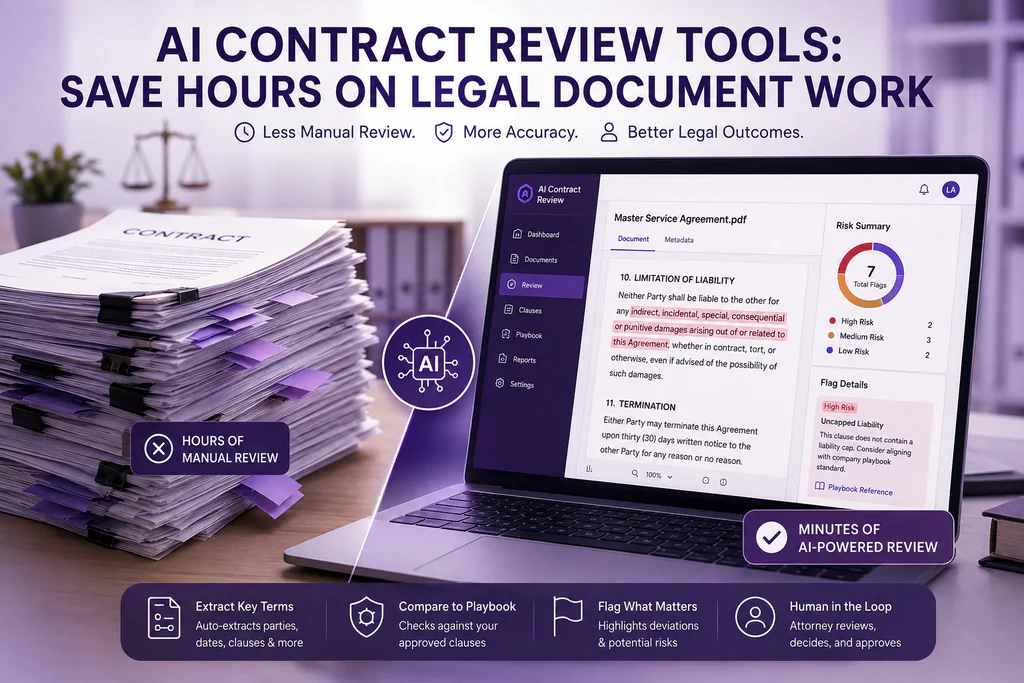
Peel back the vendor marketing and there are really just three things going on: pulling data out, checking it against something, and deciding what’s worth a human’s attention.
Pulling data out — extraction, if you want the term — means the software identifies parties, dates, renewal terms, payment schedules, governing law, all the structural bones of a contract. A model can chew through a forty-page master service agreement and spit out a metadata table in under a minute. That’s half a morning of paralegal time, gone, for something that never needed a paralegal’s judgment in the first place.
Checking it against something is the part legal teams actually care about. The software compares incoming language to your firm’s approved clause library. Say a counterparty slips in a limitation-of-liability clause that doesn’t match your standard template — the tool catches it right away instead of waiting for someone to notice the wording feels slightly off three reads in.
Then there’s the judgment call about what deserves attention: unusual auto-renewal windows, one-sided indemnification, uncapped liability, termination rights that don’t match your playbook. Decent platforms rank these by severity. You don’t want your associates treating a stray comma with the same alarm as an unlimited liability clause.
It doesn’t replace judgment. It just points judgment somewhere useful instead of somewhere tedious.
Why This Is Happening Now, Specifically
Contract volume outran headcount at most legal departments a while back, and everyone’s just been quietly absorbing the difference. According to the Thomson Reuters Future of Professionals Report, 74% of legal and fiduciary professionals are already using AI several times a week to keep pace with these exact demands. – a trend reflected in recent AI productivity statistics across the knowledge work sector.
A GC I talked to described it this way: her contract volume climbed 40% over three years, her team stayed exactly the same size. She wasn’t chasing speed for its own sake. She was trying to keep her people from burning out under a workload that had crept up on all of them without anyone quite noticing until it was already a problem.
The bottleneck these tools address is specific — first-pass review that eats senior associate hours without needing senior associate skill. Free that time up and people spend it where a law degree actually matters: negotiation calls, risk-tolerance decisions that don’t have a template answer, keeping counterparty relationships intact. That’s the stuff nobody wants to rush.
There’s a compliance angle too, one that gets less airtime than the efficiency pitch. Systematic review means fewer risky clauses slipping through because whoever’s reviewing is on contract fifteen of the day, it’s 6pm on a Friday, and their attention isn’t what it was at 9am.
Where This Genuinely Earns Its Keep
The clearest wins show up in a handful of places.
NDAs and standard vendor agreements top the list — anything template-driven, where the structure is predictable enough that pattern matching has something solid to work with. This is where the software basically pays for itself.
M&A due diligence is another one. Reviewing thousands of legacy contracts during an acquisition used to mean pulling together a small army of contract attorneys for weeks at a stretch. Now that volume gets triaged fast, with change-of-control provisions and assignment restrictions surfaced for the deal team before anyone’s even opened half the files by hand.
Portfolio-wide clause searches are underrated, honestly. Want to know how many active contracts contain a specific arbitration clause, or how many auto-renew without a 90-day notice window? Nobody’s doing that search across hundreds of PDFs manually — not accurately, anyway. It becomes a query instead of a project.
And redlining against an existing playbook speeds up the back-and-forth with outside counsel considerably, since deviations from your standard positions get flagged automatically rather than caught on the fourth exchange of drafts.
Where It Falls Apart
I’ll be blunt here, because vendor pitches tend to skip this part entirely: none of this is a substitute for legal expertise on anything genuinely novel or high-stakes.
Ambiguous language tied to jurisdiction-specific case law still needs someone who actually knows how courts there have ruled. And there’s a subtler failure mode — a clause that looks fine in isolation but creates a real problem once you factor in some obscure provision three sections away. Cross-referential risk like that is where current models tend to struggle, because they’re pattern-matching against prior contracts, and a genuinely unusual deal structure doesn’t have much prior pattern to lean on.
Data quality is the problem nobody likes bringing up in sales meetings. Train or configure the tool on your own contract history, and if that history is full of inconsistent or outdated language, the tool will confidently flag perfectly good clauses as anomalies while missing the actual problems — because its baseline is flawed to begin with. Garbage in, garbage out, same as every other corner of software.
And accountability just doesn’t transfer. If the AI misses something and it costs the client money later, “the software didn’t flag it” isn’t going to hold up with a malpractice carrier, or a judge, or frankly the client either. Whoever signs off is still the one on the hook. In fact, the American Bar Association’s Formal Opinion 512 explicitly states that lawyers maintain ultimate ethical responsibility for competent representation and must independently verify AI-generated outputs.
Evaluating a Tool Before You Buy It
Not every contract AI platform is built to the same standard, and the gap between them shows up in ways a demo won’t reveal.
| Evaluation Criteria | What to Look For |
| Training data transparency | Can the vendor explain what the model was trained on, and can you customize it with your own clause library? |
| Accuracy on your document types | Ask for a pilot using your actual contracts, not the vendor’s polished sample set |
| Integration with existing systems | Does it plug into your CLM platform, DMS, or e-signature tools without a workaround, you may need to rely on third-party AI automation tools like Zapier or Make.com to connect your tech stack. |
| Explainability | Can it show why it flagged something, or just hand you a risk score and shrug? |
| Security and confidentiality | Where does contract data live, and is it used to train models for other customers? (Tip: Ask vendors how their data practices align with the NIST AI Risk Management Framework to ensure baseline security standards). |
| Human review workflow | Is there a real escalation path from flag to attorney sign-off, or does it just assume full automation? |
Before signing anything, it’s worth running through this:
- Pilot it with 20-30 of your own past contracts, not vendor samples
- Get a straight answer on data residency and whether your contracts feed shared models
- Push the tool to justify at least three separate flags — see if the reasoning actually holds
- Check it against your current CLM or DMS setup
- Ask who’s liable if the tool gets something wrong
- Weigh pricing against hours actually saved, not the vendor’s projected number
What a Workflow Around This Actually Looks Like
Teams that get real value out of these tools didn’t treat AI as a replacement for review. They rebuilt the division of labor around it.They rebuilt the division of labor around it. (If you are new to designing these processes, check out our complete guide on how to build an AI workflow for your business).
A structure I’ve seen work:
- Intake and triage — the tool extracts key terms and routes the contract by type, value, and risk tier.
- First-pass AI review — deviations from playbook language get flagged, unusual terms get highlighted.
- Attorney review of flags — a human works through the flagged sections plus a quick pass over the rest, instead of starting cold.
- Negotiation and redline — the tool suggests alternative language based on standard positions; the attorney decides what actually goes out.
- Final sign-off — a qualified attorney approves the executed version. No exceptions here, ever.
A human is still involved at every point that requires actual judgment. What the AI does is compress a four-hour review into forty-five focused minutes — it doesn’t remove the review.
What This Actually Costs
Pricing swings widely — per-seat SaaS subscriptions running a few hundred dollars a month on the low end, enterprise deployments running into six figures annually once you factor in custom playbook integration for a large organization with serious contract volume.
The number that actually matters isn’t the subscription line item. It’s the hourly cost of the associate or paralegal time getting freed up, multiplied across however many contracts move through your pipeline monthly. Much like adopting the best general AI productivity tools, What seems like a minor improvement on a single contract can become a major operational advantage at scale. Across 50 monthly reviews, a 90-minute reduction per document can generate nearly 75 additional hours for higher-value legal work and strategic priorities. Key Takeaways
- The tools handle extraction, playbook comparison, and risk flagging — legal judgment doesn’t get replaced, it gets redirected to where it’s actually needed.
- Standard agreements, M&A due diligence, and portfolio-wide clause searches are where the payoff is clearest.
- Novel deal structures and cross-referential risk still require someone who’s done this a long time.
- Evaluate on explainability and data transparency — not just the accuracy number in the sales deck.
- Real ROI comes from recovered attorney hours, not the subscription price.
Frequently Asked Questions
1. Can AI contract review tools fully replace a lawyer? No. They’re solid at first-pass extraction and flagging, but risk tolerance calls, negotiation strategy, and sign-off still need a qualified attorney behind them.
2. How accurate is AI at catching risky clauses? Depends heavily on the tool and the document type — pilot it against your own contract library rather than trusting a vendor’s headline accuracy number.
3. Is contract data safe with these platforms? Entirely dependent on the vendor. Ask directly whether your contracts train shared models and where the data actually sits.
4. What size legal team benefits most? Teams with contract volume outpacing headcount see the fastest payoff, though smaller teams drowning in routine NDAs and vendor agreements benefit too.
5. Does this work for non-English contracts? Multilingual support has come a long way, but it varies by vendor — test it against your specific languages before committing.
6. How long does implementation take? A few weeks for a straightforward SaaS tool, several months for an enterprise deployment with custom playbook training.
7. How is this different from CLM software? CLM handles the full contract lifecycle, request through renewal. AI contract review is often a feature inside a CLM platform, or a standalone tool that plugs into one, focused specifically on the analysis stage.
8. Does it work on scanned or handwritten contracts? Most rely on OCR for scans, and handwritten annotations tend to trip it up more than typed text does — worth checking vendor specs if that’s a real chunk of your document set.